October 18, 2010

FAQ: How can I hide the photos and videos my friends tag me in on Facebook?

Yes, you can and it's not a bad idea to do that. You never know what photo will surface from your past and you probably don't want your family, friends or coworkers seeing those crazy days, right?

What you can do is apply privacy settings to your profile in order for these photos to only be visible to you, specific people or a list of friends. It depends on how restricted you want it.

To do this:

1. Click Account.
2. Select Privacy Settings.
3. Click on Customize Settings.


4. Scroll down to the Things others share section.
5. Click the pull-down menu next to Photos and videos I'm tagged in.


6. Select Custom.
7. Select Specific People to let only some people see these photos or videos.


You can also select Only Me, if you don't want anyone except yourself seeing photos or videos you're tagged in.

8. If you select Specific People then enter their names in the field below the pull-down menu. if you use Friend lists you can type in the name of the list to allow a group of people to view it.
9. Click Save Setting.


You can do the reverse as well. If you don't mind most of your friends to be able to see the photos and videos you're tagged in then you can select the people you want to hide information from.

To do that enter the names or friend list in These people: field under "Hide this from".


And that's it, from here on only those people will see any photos or videos you're tagged on.

Let me know if that helped in the comment section below.


October 05, 2010

How To: How to personalize your Facebook Profile link with a customized username

Do you remember when Facebook launched "claim your username"? If not, and you missed it you can still claim your username to make your Facebook profile page URL more friendly and easy to remember. A lot of people ask me why should they claim their username, and this is the best way I can explain it. 


Well you really don't need a username but it's a nice to have for the following reasons.
  1. You have a more personalized URL that you can give out to your friends or publish on your social site's pages or website.
  2. A personalized URL gets you more noticed and you're easier to find. If you have a business or want to get noticed, this is something you would want. You get your brand noticed easier and quicker.
  3. It avoids online identify theft. If you don't claim your name some one else will. Just think about it, if people find you in search engines wouldn't you want the information found to be written or owned by you rather than by some one pretending to be you? That's why having blogs, web sites, and social site profiles are not a bad thing, they give you the opportunity to have a online identity and represent yourself.
It's recommended you select your actual name. Remember you don't want anyone pretending to be you, right? So you see, it's not just about having a username, it's about having a presence.


Now let's get to the good stuff, to claim your username:

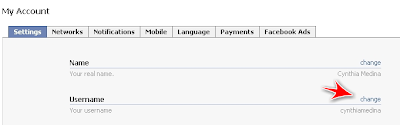
1. Click Account and select Account Settings.
2. Click Change under Username.


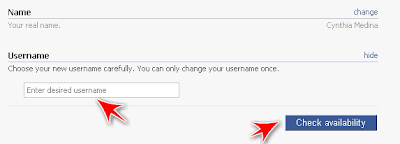
3. Enter the username of your choice.


Remember this is going to be the URL for your Facebook profile page, for example: http://www.facebook.com/username. Doesn't that beat having a URL like this;http://www.facebook.com/profile.php?id=1337590867


4. Click Check availability button to check if that username is available.
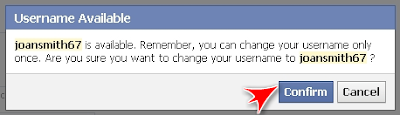
5. Click Confirm if you want to keep this username.


Just keep in mind you can only change it once so think about it before clicking confirm. After you click confirm you will no longer see the Username option under Account Settings.


If you ever forget your username just click the link at the top right of your profile page and it will display your URL in the address bar. Your username are the characters after the slash (/).


Simple right?


My Facebook URL is http://www.facebook.com/cynthiamedina

What's yours? Tell us in the comment section.

July 10, 2010

5 Reasons the Virtual Event Niche is so popular

Check out this video from Craig Cannings from the VAClassroom.com on the "5 Reasons the Virtual Event Niche is so Popular.


A brief message from Craig Cannings on Virtual Event Services


VAClassroom.com offers certification courses for virtual assistants. Their courses are jammed packed with a wealth of valuable content and with the inspiration of Craig Cannings.

Are you a virtual event planner? Tell us your experience in the comment section.


July 01, 2010

VS: Great comparison: HTC EVO vs iPhone 4

Check out this video for the most hilarious comparison of HTC EVO and iPhone 4.


What do you think about the HTC EVO vs iPhone 4? Tells in the comment section below.


June 13, 2010

Free eBook with Top Internet Marketing Tools and WordPress Plugins

I stumbled upon (and I'm not talking about the site) on this free ebook that offers the ultimate collection of free and paid Internet Marketing tools and WordPress plugins.

Even though this blog is to review Social Media sites and apps, I think this ebook offers a lot of value for my Social Media friends. A lot of tools mentioned here are not only used for Internet Marketing but also for blogging, social networks, graphic design, and so many other things that I thought not offering this ebook on my blog would be a disservice to you all.

The ebook is called "The Ultimate Toolkit for Internet Marketers" and it's composed of 37 free tools, 23 paid tools, and 30 top WordPress Plugins. The author Peter Downs really did a great job and compiling this ebook.

You can download the ebook and thank me later :O)


Do you have any resources you would like to share with us? Share them in the comment section below.

Share/Save/Bookmark

June 03, 2010

FAQ: How do I make my Facebook Friends List private?

This use to be as simple as clicking on the little pencil on the Friends box on your profile but after all the latest Facebook privacy changes this too has changed. But not too worry, it's very simple.

If you don't want your friends list to be visible to everyone or even your friends you can choose to make them only visible to you. After all you don't want to hurt any one's feelings if they don't like the friend list they are currently in, right?

So to change the settings:

1. Click  Account > Privacy Settings.

2. Click View settings link under Basic Directory Information.

3. Select Customize under the section "See my friend list".


4. From the pull-down menu under "Make this visible to" section Only me.


5. Click Save Setting.

Did this help? Let us know in the comment section below.


Share/Save/Bookmark

May 21, 2010

How To: How to avoid wind noise when recording your podcast

When recording a podcast on a windy day, it's hard to get rid of the wind noise. So Rick came up with a very clever homemade windscreen that can be used for pretty much every microphone device. In his case he uses the Zoom H2 which is a great tool for podcasting.

Check this video, Rick shows you how to DIY.


I myself may try it I too use the Zoom H2.

Something similar called "Rode Deadcat Microphone Wind Muff" sells on Amazon for $39.37. I think if you do it yourself it comes out cheaper and it looks pretty simple to make.

What do you use to eliminate the wind noise?


May 16, 2010

Have you checked the privacy settings in the Facebook applications lately?

Everyone has been so worried about all the changes Facebook has done with the privacy settings but I don't think anyone is looking at the privacy settings in the applications themselves.

I'm talking about the applications where you fill out surveys, play games, and so many other things. These apps have privacy settings and by default they are set to allow "Everyone" to see your information.

Now I'm not saying letting everyone see your survey results is a bad thing but if you're concerned with your privacy this is another place you should look at.

To change the app settings go to Account > Application Settings and click the Edit Settings that corresponds to each app.

Do this for every app. If you're someone that spends to much time playing stuff on Facebook then you'll have lots of apps to update.

If you app list is just to big and filled with apps you don't use I would suggest you first change the privacy settings of all the apps and then click the X to delete the ones you don't use. Remember, even though you delete things from the web it doesn't mean it will disappear :O(

Does this post help you? Let us know in the comment section below.


Share/Save/Bookmark